For those who work with subcontractors
Software for freight forwarders
- You answer to
- Customer and carrier
- Subcontractors
- Like your own trucks
3 days free, on Ultra Light and Light, with monthly payment
Subcontractor records
Customers and subcontractors, in the same list.
- Their trucks
- On the order, like your own
- Their company
- You check it with ANAF, by tax ID
- Their drivers
- They can have an account in the driver app
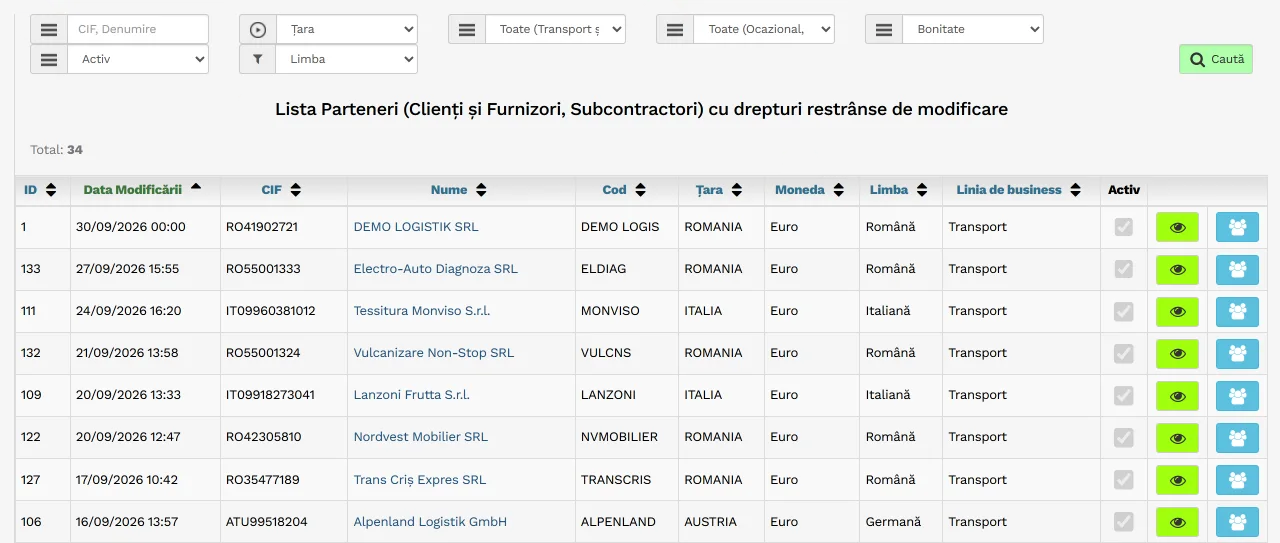
- Customers, suppliers, subcontractors: one list
- Search by tax ID or by name
Demo data
From the customer's order to profit, in 4 steps.
-
The customer gives you the order.
Customer order990452
- Client
- DEMO Textil SRL
- Agreed price
- 1.850,00 EUR
- Loading
- Cluj-Napoca, RO
- Unloading
- Nürnberg, DE
-
You place the subcontractor order in one click.
It goes out by email to their contact person.
Generate Order/Contract for Subcontractor
Transport order
No. 1187 dated 07/10/2026
DEMO Rapid Trans SRL1.480,00 EUR
Contract 1187 - 07/10/2026
-
Invoices, CMR and payment sit on one row.
One row for each trip, from order to payment.
Subcontractor ordersDEMO Rapid Trans SRL
- Customer order990452
- Your order1187
- CMRAttached
- Your invoiceFCT-0431
- Their invoiceDRT 1184
- Payment to themOP 3391
-
See the profit of each trip from the day of the order.
Until the invoices arrive, profit is based on the agreed prices and corrects itself.
Profit Centretrip 990452
Demo data. Subcontractor orders: from the Light plan upwards. See pricing You print the register of brokered orders from the software.
The customer finds out before they call.
-
An email at every confirmation
Emails to the customerorder 990452
We have finished loading
Cluj-Napoca, RO
We have finished unloading
Nürnberg, DE
CMR attached
The customer receives an email automatically when the driver confirms in the app. At unloading, with the CMR attached.
-
A tracking link
Order 990452In progress
1 of 2 stages done
- LoadingCluj-Napoca, RODone
- UnloadingNürnberg, DENext
They open it on their phone, with no account and no password.
-
The invoice, with the CMRs
DEMO Logistik SRLto DEMO Textil SRL
Invoices FCT-0431 - 12/10/2026 for Orders TO-24852
Invoice FCT-0431 - 12/10/2026
CMR_51214_TO-24852.jpg
The email goes out with the invoice PDF and the CMRs from the order file.
Demo data: order 990452.
In brief
Modules for forwarding
Soft-Transport holds both ends of the trip.
Your company's automation starts today.
- Trial
- 3 days, on Ultra Light and Light, with monthly payment
or call 0756 777 722