For accountants and managers
Invoicing software for transport companies
- Primary bookkeeping
- Built into the software
- Works with
- ANAF e-Factura · BNR rate · Excel
3 days free, on Ultra Light and Light, with monthly payment
Invoicing and due dates
Invoice List: each invoice, next to its order and CMRs
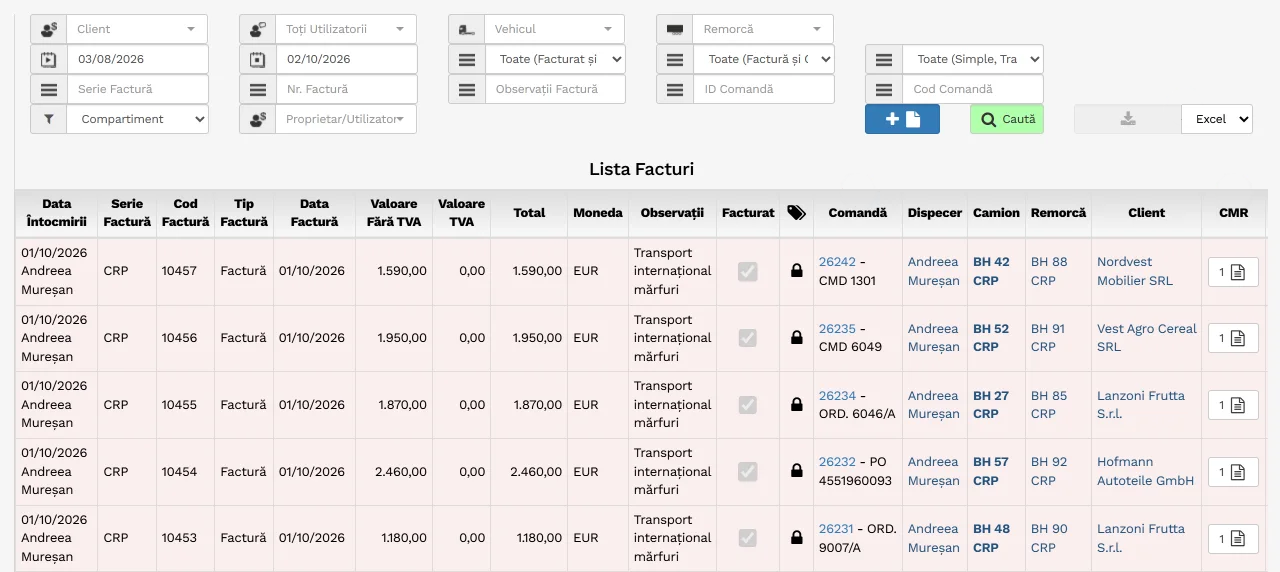
- By customer, series, period or order
- The invoice, linked to its order: dispatcher, truck, trailer
- The order's CMRs, next to the invoice
- The list, in Excel: short, for the accountant
- Invoices and Credit Notes, in the same list
The money of each order, on a single row.
- Invoice
- From the order, with the CMR attached
- Different Credit Note
- The amount turns red
- Plans
- Included in every plan
Drawing: the Invoicing window of the software, version 34, with the order row 990431 - TO-24817 for Musterfracht GmbH. Below it, seven steps, from the uninvoiced order to payment received; each step has its description below.
You follow the money of an order on a single row: the invoice, the Credit Note, the claim and the payment received. You issue the invoice from the order and send it to the customer with the CMR attached. Under the invoice sits the customer's Credit Note. When their Credit Note does not match your invoice, the amount turns red. Invoicing, Credit Notes and claims are included in every plan.
-
Not invoiced. By default, the Invoicing page shows the orders that do not have an invoice yet, each with the agreed price, the CMRs and the estimated road tolls.
Drawing: the Invoicing page of the software, with the Not Invoiced and No Invoices filters. Three orders without an invoice. The first, 990431 - TO-24817 for Musterfracht GmbH, with truck B 101 DEM, has one CMR, no invoice, estimated road tolls of 323,80 and an agreed price of 1.650,00 EUR. At the bottom, the list totals.
-
The invoice. The invoice is filled in from the order and the customer record: the agreed price, the due date by the customer's rule and, for an invoice in euros, the National Bank of Romania (BNR) exchange rate.
Drawing: the Order Invoicing window, with invoice row FCT 0418 of 09/10/2026, due 11/11/2026, for 1.650,00 EUR; at the question mark next to the code, the note: the free number in the series is suggested. The Generate invoice button opens the Invoice window: the Export EUR template, Romanian language, and Agreed Price is chosen under Price. The draft has coloured areas: the supplier and the customer; the invoice date, the due date 11/11/2026, the exchange rate 5,0874 and the VAT rate 0%; the transport with truck B 101 DEM, driver Matei Andrei and the price of 1.650,00 EUR; the totals, 1.650,00 EUR, that is 8.394,21 RON. Three labels show where the fields come from. From the partner record: the due date is 30 days from the document handover date, and the documents were handed over on 12/10/2026, so 11/11/2026; Invoice with VAT is NO, so the VAT rate is 0%. From the BNR exchange rate of 08/10/2026, the day before the invoice: 1 EUR = 5,0874 lei, so 1.650,00 EUR makes 8.394,21 RON. After Save and Print, the Invoice column shows 1, and you tick Invoiced yourself, by hand.
-
Email. The software prepares the email with the invoice and the CMRs from the order file. You check it and press Send Email.
Drawing: on the order row the order is ticked, then the window Send invoices by email: Musterfracht GmbH - 990431 opens. Recipient: Jana Becker (Buchhaltung) - Invoicing. Subject: Invoices FCT0418 - 09/10/2026 for Orders TO-24817. The message signed Elena Dinu, DEMO Logistik SRL, the invoice table, the CMR table and the attached files, ticked: invoice FCT0418 - 09/10/2026 and CMR_51207_TO-24817.jpg. At the bottom, the Send Email button.
-
Credit Note. The customer pays according to their own Credit Note. You enter it on the order, under the invoice, and the amount turns red while the two are not equal.
Drawing: in the Order Invoicing window a new row of type Credit Note is added: GS-48211, dated 20/10/2026, for 1.600,00 EUR. After saving, on the order row, under the invoice of 1.650,00 EUR the Credit Note of 1.600,00 EUR appears, and the amounts turn red; the Invoice column goes to 2, because it also counts Credit Notes. A magnifier enlarges the cell: invoices 1.650,00 EUR, Credit Note 1.600,00 EUR. At the top, in the Invoice No. filter, GS-48211 is searched and the list shows the order.
-
The difference. Customer Km and the road tolls by country show where the missing 50,00 € comes from: 22 unpaid km (35,17 €) and 14,83 € of the toll in Hungary.
Drawing: the Customer Km window: Empty Km 18, On-board Km 1047, GPS Km 1041, Planned Km 1032 and Customer Km 1010, the only field you can write in; 1.032 minus 1.010 makes 22 km. The Order Road Toll Cost window, by country, estimated and paid by the customer: Romania 16,00 and 16,00 EUR; Hungary 98,40 and 83,57 EUR; Austria 139,60 and 139,60 EUR; Germany 69,80 and 69,80 EUR; total 323,80 estimated and 308,97 paid. For Hungary, 14,83 EUR is missing.
-
The claim. From the Credit Note row you open the claim: the kilometres, the amount, and when and how you sent it. Then you record the accepted amount and the payment.
Drawing: the window Register Claim for Credit Note: GS-48211, 20/10/2026, Musterfracht GmbH. On the left: reference GS-48211, 22 km claimed, template Unpaid km, amount claimed 50,00 EUR, sent by email on 22/10/2026. On the right: resolved on 05/11/2026, amount accepted 50,00 EUR, the note Accepted: 1.032 km and HU toll, payment document Zahlungsavis 25/11/2026 and payment date 25/11/2026. On the order row: Claimed 50,00 EUR and Accepted 50,00 EUR.
-
Paid. The second Credit Note, of 50,00 EUR, makes the amounts equal, and the red goes out.
Drawing: in the Order Invoicing window a second Credit Note is added, GS-48377, dated 06/11/2026, for 50,00 EUR. The amounts become equal, 1.650,00 EUR and 1.650,00 EUR, and the red disappears from the row and from the magnifier; the Invoice column shows 3. GS-48377 is searched in the Invoice No. filter. At the bottom: Total Invoices 1.650,00 EUR, Total Credit Notes 1.650,00 EUR, Total Road Toll Cost 323,80, Total Agreed Price in EUR 1.650,00 EUR.
Payments, receipts, cash, bank and expense settlements, in the same software.
See at any time who has paid you, what you still have to pay, how much money you have in the bank and how much each driver still has to return.
- Cash and bank
- The registers write themselves
- The driver's advance
- With their expense settlement
- Plans
- Included in every plan
Four steps, with fragments from the software and made-up data. Step 1: payment OP 3310 of 15/09/2026, for 6.715,50 EUR, from Bank EUR, covers leasing invoice DLS 0917, which has one row for each truck: 2.238,50 EUR for B 101 DEM, B 103 DEM and B 105 DEM. With two rows ticked, the amount distributed across invoices is 4.477,00 EUR and stays red; with all three it is 6.715,50 EUR and turns green. Step 2: in the Invoice List, by Credit Note GS-47702 the invoice FCT0396 of Musterfracht GmbH is found, with 1.580,00 EUR unpaid; after “Mark as paid”, 0,00 EUR is left unpaid. Step 3: in the bank register, the account Bank EUR has opening balance 42.180,55, receipts 1.580,00 (OP 7712), payments 8.392,70 (OP 3310 and OP 3318), transfer operations −2.000,00 and closing balance 33.367,85 EUR; transfer SCH 014 of 22/09/2026 is a currency exchange: it takes 2.000,00 EUR out of Bank EUR and deposits 10.172,20 RON into Bank RON, at the rate of 5,0861 RON for 1 EUR. Step 4: the Cash Payment Order DP 112 of 02/09/2026, for Matei Andrei, 100,00 EUR, is printed in two copies, with a place for the signatures of the cashier, management and employee. In the Expense Settlement, of the 100,00 EUR drawn he accounted for 60,00 EUR and still has to return 40,00 EUR.
The cash book and the bank registers write themselves. The driver's advance has its own expense settlement. Plans: Included in every plan.
-
You pay the supplier and tick what the payment covers.
You always know which invoice is paid and what you still have to pay.
OP = payment order. DLS 0917 = one invoice for 3 trucks.
-
The customer pays: you find the invoice by its Credit Note.
You mark the invoice as paid and see who has paid and who has not.
Credit Note = the customer's document for your trip. The customer pays by its number.
-
The cash and bank registers write themselves.
Steps 1 and 2 are already here. Payments: 8.392,70 = 6.715,50 (OP 3310) + 1.677,20 (OP 3318).
Balance = how much money you have in the account. Transfer = you move money between accounts.
-
The driver takes 100 EUR, brings receipts for 60 EUR and gives back 40 EUR.
You always know how much each driver still has to return.
Cash payment order = the paper the driver signs when taking the money. Expense settlement = the driver's receipts, set against the money taken.
Each expense on its own truck, each part with its own voucher.
- Consumption voucher
- By truck, trailer or employee
- Stock
- On any past day
- Plans
- Included in every plan
Drawing: the path of a part through the software, on four screens. Invoice DPC 7781 of 03/09/2026, from DEMO Piese Camion SRL, is entered only once; its rows ticked “Stock” go into the Central Warehouse stock location: Brake pad set, 5 t lashing strap and 6 kg fire extinguisher, Grand Total 7.339,98 RON. In the Central Warehouse, on 10/09/2026, the brake pad set has minimum quantity 2, received 2, issued 0, stock 2. The round button “Take the part from the warehouse” is the mechanic taking the part. After pressing it, issued becomes 1 and the stock drops to 1, below the minimum of 2, and the row “Below Minimum Quantity” appears. Consumption Voucher BC 0412 of 10/09/2026 is written: stock location Central Warehouse, product Brake pad set, source DPC 7781, quantity 1, expense type Spare parts, resource B 101 DEM, total value excluding VAT 2.543,05 RON, that is 500,00 EUR, with a place for the signatures of the storekeeper, department head and recipient. In the activity report of B 101 DEM for 09/2026, under the truck's expenses, next to leasing (1.850,00 EUR) and the Austrian road toll (1.118,80 EUR), the row B.C., Brake pad set, 2.543,05 RON appears. Next to it, the Purchases Summary puts the months side by side: truck leasing is 5.550,00 in July, August and September 2026, road tolls 5.874,60, 6.231,90 and 6.012,80, repairs 820,00 in July and 1.200,00 in September.
Consumption voucher: by truck, trailer or employee. Stock: on any past day. Plans: included in every plan.
You enter an invoice only once, and each row has its own path. If you enter it a second time, the software stops you. Parts sit in a stock location: a warehouse, a truck, a trailer or an employee. You print the Goods Received Note, the Consumption Voucher and the Transfer Voucher, with space for signatures. Made-up data.
Also here: Stock Locations ListStock TransferStock Sales List (invoice or delivery note)Stock Issues Summary (consumption by month)Link Purchase to an Order (expense per trip)Purchase Warnings. In the new version: Pallets and packaging, in accounting.
The profit of each truck, expense by expense.
- Each invoice
- By truck, trailer or driver
- At month end
- Profit for each truck
- Plans
- Included in every plan
Drawing: truck B 101 DEM, with trailer B 202 DEM. The height of the tarpaulin is the September revenue, 18.430,00 EUR, from invoiced orders, excluding VAT. Stacked inside it, from the bottom up: refuelling 4.212,00 EUR, leasing 1.850,00 excluding VAT (from the leasing invoice of 6.715,50 EUR including VAT, for three trucks), road tolls 2.592,40 (Austria 1.118,80, Germany 558,40, Hungary 787,20, Romania 128,00), RCA insurance 210,00, consumption voucher 500,00, receipts from the settlement 60,00, trailer 612,00, driver 3.480,00 and overheads 1.573,60. At the top, 3.340,00 EUR of profit remain. Next to the drawing, the truck page of the software, Cost Centre/Truck, is filled with the same rows.
With the keyboard keys you choose another truck, B 103 DEM or B 105 DEM, and its tarpaulin fills up again. B 103 DEM keeps 74,30 EUR. For B 105 DEM, expenses exceed revenue: a loss of 1.204,80 EUR. Together, the three trucks leave 2.209,50 EUR in September.
You assign each invoice to the truck, trailer or driver it refers to. At month end you see, for each truck, the revenue, the expenses and the profit or loss. Included in every plan.
The tarpaulin is the month's revenue. In September, B 101 DEM brought in 18.430,00 EUR from invoiced orders, excluding VAT. One by one, its expenses fill it from the bottom up.
First, the truck's invoices. Refuelling, leasing and road tolls are entered on B 101 DEM; from the leasing invoice only its own row counts. September's refuelling stays in September, even if the invoice arrived on 2 October.
Then, insurance, parts and vouchers. Of the RCA motor liability policy paid for a year, only the 30 days of September count. The brake pads come from the warehouse, on a consumption voucher. Parking and washing come from the driver's expense settlement.
The trailer and the driver, by days. Their share is split across the trucks they ran with, by days or by kilometres. For B 101 DEM it is by days: Matei Andrei was on it for 26,40 days out of 30, so the share of those days goes here.
Overheads, by kilometre. Rent, office salaries and other overheads are split across the trucks by the kilometres driven: 0,14 EUR per km, at 11.240 km.
What is left is the profit or loss. B 101 DEM left 3.340,00 EUR in September. Choose another truck and see its tarpaulin fill up.B 103 DEM barely covers its expenses: 74,30 EUR is left.For B 105 DEM, expenses exceed revenue: a loss of 1.204,80 EUR, because of a repair of 1.200,00 EUR and only 19,50 days worked.
B 101 DEM : activity report 09/2026
REVENUE GENERATED
TRUCK EXPENSES, 11.240 km
TRAILER EXPENSES - B 202 DEM, 11.240 km, 26,40 days
DRIVER EXPENSES - Matei Andrei, 11.240 km, 26,40 days
OVERHEAD ALLOCATION
Overheads Alloc. to VehicleOverheads/1 kmEstimated Profit/Vehicle
B 103 DEM : activity report 09/2026
REVENUE GENERATED
TRUCK EXPENSES, 9.180 km
TRAILER EXPENSES - B 204 DEM, 9.180 km, 24,10 days
DRIVER EXPENSES - Rusu Dan, 9.180 km, 24,10 days
OVERHEAD ALLOCATION
Overheads Alloc. to VehicleOverheads/1 kmEstimated Profit/Vehicle
B 105 DEM : activity report 09/2026
REVENUE GENERATED
TRUCK EXPENSES, 6.020 km
TRAILER EXPENSES - B 206 DEM, 6.020 km, 19,50 days
DRIVER EXPENSES - Pop Ilie, 6.020 km, 19,50 days
OVERHEAD ALLOCATION
Overheads Alloc. to VehicleOverheads/1 kmEstimated Profit/Vehicle
Also here: Cost Centre Summary/Truck, the trucks one under the other (in September, 2.209,50 EUR); click on an amount: the truck page · Order Settlement, the profit of a single trip, at any time · cars, from the vehicle record: their cost goes to overheads.
Invoice DCC-26-0917DEMO Card Carburant SRL
Invoice Date02/10/2026
Refuelling02/09 – 29/09/2026
4.212,00 EUR excluding VAT
Invoice DLS 0917DEMO Leasing IFN SA · 05/09/2026
Leasing · B 101 DEM1.850,00 excluding VAT
Leasing · B 103 DEM1.850,00
Leasing · B 105 DEM1.850,00
6.715,50 EUR including VAT
Invoice DTS 55102DEMO Toll Services GmbH · 30/09/2026
ATRoad toll Austria · B 101 DEM1.118,80
DERoad toll Germany · B 101 DEM558,40
RCA policy · B 101 DEMDEMO Asigurări SA · 2.555,00 EUR per year
AugSep210,00 EUROctNovDecJanFebMarAprMayJunJul
September: 30 days × 7,00 = 210,00 EURthe rest stays prepaid
Consumption Voucher BC 0412Central Warehouse · 10/09/2026
Brake pad set, 1 set → B 101 DEM
2.543,05 RON = 500,00 EUR
BF 033108/09/2026
Parking24,00
from Settlement: Matei Andrei
BF 118714/09/2026
Washing36,00
from Settlement: Matei Andrei
Trailer B 202 DEMB 101 DEM's share, by days
612,00 EUR
Matei Andrei, driver26,40 days out of 30 on B 101 DEM
daily allowance 2.159,85 EUR · salary 6.714,40 RON
3.480,00 EUR
Overheadsrent, office salaries and others
3.701,60 EUR ÷ 26.440 km
= 0,1400 EUR per km
× 11.240 km = 1.573,60 EUR
Invoices go straight from the software: to SmartBill, to the accountant, to the customer.
- SmartBill
- SmartBill fiscal number
- SAGA
- Package for the accountant, no retyping
- Also works with
- ANAF e-Factura · BNR rate · Excel
Drawing: the invoice FCT 0418 of customer Musterfracht GmbH, for 1.650,00 EUR, in the invoice list of the software, with a pile of other invoices underneath. Three paths start from it. First: the “Issue with SmartBill” button sends the invoice to SmartBill; the invoice gets the SmartBill fiscal number, here SB 0231, and the PDF opens at once. Second: each month, the invoices go out in a single package for the accountant, who imports it into SAGA, with no retyping. While a tax ID is missing, here for customer DEMO Textil SRL, the barrier is down and the package cannot be downloaded. Once you fill in the tax ID, the barrier goes up: the message “No problem that would stop the package” appears, and the September 2026 package, with 38 invoices and 14 customers, reaches the accountant. Third: the invoice goes out by email, with its PDF, to the customer.
The invoice is issued directly in your SmartBill account: it gets the SmartBill fiscal number, and the PDF opens at once. The accountant receives a package with the issued invoices and their customers and imports it straight into SAGA, with no retyping. It also works with ANAF e-Factura (a link leads to the Documents and ANAF page), the BNR currency exchange rate and Excel. Below the drawing: what else SAGA and SmartBill each do, with its own PDF guide.
Invoices in the software
FCT 04181.650,00 EUR
Musterfracht GmbH
“Issue with SmartBill”
SmartBill
SB 0231PDF
SmartBill fiscal number
or, each month, a single package
one blockage: DEMO Textil SRL
has no tax ID
No problem that
would stop the package.
accountant · SAGA
September 2026
38 invoices · 14 customers
the package cannot be downloadedthe accountant imports it, no retyping
by email, with the invoice PDF
Musterfracht GmbH
Dashboard: one click on a figure leads to its rows.
- Dashboard
- One for each type of user
- The figures come from
- What you enter in the software anyway
- Extra cost
- None See pricing
DEMO Logistik SRL, 3 trucks
2.209,50 €
fleet profit in September 2026
B 101 DEM left 3.340,00 € over 11.240 km
Matei Andrei: 10 orders, score 9 and 75 litres below standard fuel consumption.
The driver's extended report puts their month on one page: the orders, the kilometres, the CMRs with reservations, the technical reports, the refuelling and the consumption against the standard.
The Extended Driver Report window for Matei Andrei, from 01/09/2026 to 30/09/2026, with B 101 DEM and trailer B 202 DEM. Turnover: 10 orders; the first four are shown, for DEMO Cargo SA, Musterfracht GmbH and DEMO Textil SRL, each with the kilometres, the days, the kilometres at the customer, the difference and the mark. In total: 11.240 kilometres driven in 26,40 days, 10.830 kilometres at the customer, a difference of minus 410 kilometres, that is minus 3,79%, average difficulty 3 and average mark 9. Zero CMRs with reservations, zero employee reports, one technical report, 8 refuellings with 3.369,60 litres. FAZ: actual consumption 3.369,60 litres, standard consumption 3.444,60, so 75 litres below the standard. Made-up data.
Dashboards: one for each type of user. The figures come from what you enter in the software anyway. Extra cost: none.
Of 39.870 € invoiced, 2.209,50 € is left
DEMO Cargo SA brings in a third of the revenue.
Turnover puts customers in rows and months in columns. One click on an amount and you see the invoices behind it.
On the dashboard you see, for each customer, how many deliveries arrived on time. Customers below 90% appear first.
The Turnover window, excluding VAT, with customers in rows and the months July, August and September 2026 in columns. In September: DEMO Cargo SA 13.290 euros, DEMO Textil SRL 11.030, Musterfracht GmbH 9.580, DEMO Agro SRL 5.970. The total for September is 39.870 euros, and for the three months 114.020. One click on the DEMO Cargo SA amount for September opens the customer's Invoice List for September: FCT 0398 with 2.480 euros, FCT 0401 with 2.950, FCT 0404 with 2.610 and 2 more invoices. Next to it, the On-time delivery by customer panel from the dashboard, for September, with the weakest customer first: DEMO Agro SRL 67%, in red; DEMO Textil SRL 86%, in yellow; DEMO Cargo SA 90% and Musterfracht GmbH 100%, in green. The average rate is 86,7%: 26 deliveries on time out of 30. Made-up data.
September: 7.980 litres of diesel, in 4 countries
In Romania a litre cost 1,22 €, in Germany 1,36 €.
On the dashboard you see how many litres you put in each country and what a litre cost you there. One click on a bar: the same country over 12 months. One more click: the refuelling list.
The figures on the dashboard are the same as those in the list.
The Manager dashboard, with the Refuelling by country panel, in litres, for September: ROMANIA 3.180 litres at 1,22 euro per litre, UNGARIA 2.240 at 1,27, AUSTRIA 1.420 at 1,29 and GERMANIA 1.140 at 1,36; 7.980 litres in total. One click on the UNGARIA bar opens the Trend window with the last 12 months for UNGARIA, with the price per litre under each month; September is in bold. One click on September opens, in a new tab, the Refuelling List filtered on UNGARIA, from 01/09/2026 to 30/09/2026, all statuses: the refuellings of trucks B 101 DEM, B 103 DEM and B 105 DEM, each with the city, the card, the date, the quantity and the price per litre, between 1,26 and 1,28 euro excluding VAT. The five quantities add up to 2.240 litres, like the UNGARIA bar. Made-up data.
Windows redrawn from the software. Made-up data.
- “How much do I earn on each order?”
- Profit Centre / Order
- “How did the months compare, side by side?”
- Monthly Statistics
- “How did each dispatcher perform?”
- Dispatcher Indicators v2
- “Which driver is the best?”
- Driver Ranking
- “Do deliveries arrive on time?”
- On-time delivery by customer
- “Where was something entered wrongly?”
- Order Warnings
Also here: Active orders by dispatcher CMR warnings Trip statistics by dispatcher and customer Weekly Productivity of Contract Customers Refuelling by customer and country Turnover and vehicle fleet.
For profit by subcontractor and by groupage, see the Freight forwarders page.
In brief
What accountants and managers say
Checking the invoicing of all the trips made, in a very short time and very precisely.
Works with
ANAF e-Factura BNR rate Excel (export) SAGA and SmartBill (in the new version)
Your company's automation starts today.
- Trial
- 3 days, on Ultra Light and Light, with monthly payment
or call 0756 777 722